
 Jonathan ReedNo. 551 · Graphic Designer and App Developer


 Apple
Apple Designers
 Founders
 IKEA
IKEA Minimal
 Plants
 Standing Desks
 Sheds & Garages
 How five designers actually use Figma
Jonathan Reed has been a graphic designer for over 25 years. He also writes, makes a podcast and has recently started building apps, among them The Slate, a way to keep track of upcoming projects from your favorite movie and TV talent.
Design is the passion he gets paid for. Movies, TV and technology are the passions that spend that pay.
In recent years he has moved to working from home, with an eye to broadening his skill set into writing and app development.
He likes to say that he lives in an unnecessarily smart home in London with his wife and daughter.
Follow Jonathan on The Slate and at jonathanreed.me.
What is the most recent item that you’ve added to your workspace?
The Logitech MX Creative Console. I actually ditched the dial pad pretty quickly, but found the keypad to be incredibly useful. I know there are other products on the market that do the same thing, but there’s something about Logitech’s setup and their software that makes it a lot more powerful to me.
The context switching when you are in different apps is incredibly useful. If I’m in any Adobe product, I have access to quick actions or filters that would otherwise involve me burrowing into menus. If I’m doing app development, I can have different shortcuts for use in Claude or Xcode. The tactileness of it also makes it feel much more intentional.

What is one change you’d like to make to your current workspace?
I’d love a bigger desk, but it’s just not possible within our bedroom. Sometimes it can feel a bit cramped, and I’ve had to do a lot of shifting around to get to the optimum arrangement that I have now. Don’t get me wrong, I’m very happy with how it is, but more space would always be useful for spreading out designs and notes.

Why did you settle on the Apple Studio Display?
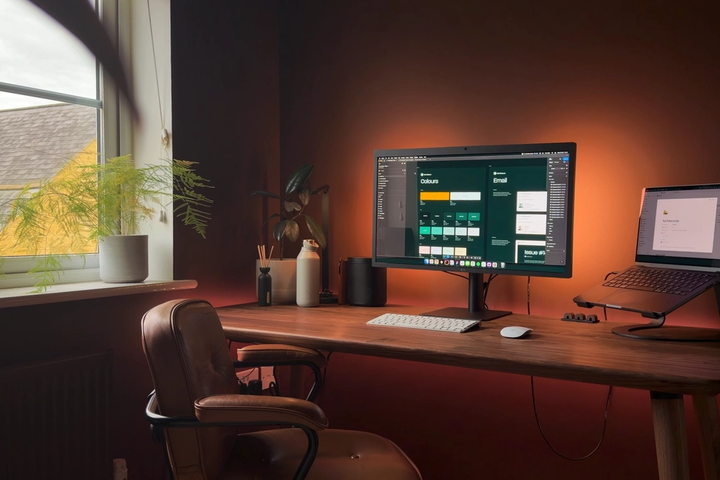
As a designer, the monitor was an easy choice: the Apple Studio Display, maybe using a very old panel, but it’s still an excellent, very old panel. It’s 5K, the colour is good, and switching between the laptop and the display is very smooth in the way Apple always makes these things. I know some people favour screens from third parties that, on paper, are technically better, but this just works, and it works well.

What considerations had to be taken when designing your workspace in your bedroom?
Unfortunately, I don’t have another space in the house to be able to work, so the only option was putting a desk in the bedroom. This meant the aesthetic of the desk had to be as unintrusive as possible. We already had lots of furniture in light oak, so it was important to match that to the desk. I also didn’t want to have any wires sticking out, and everything needed to be very tidy.
The standing desk that I got from Oakywood has an absolutely gorgeous slab of wood on the top, and the cable management underneath is really good too. I optimised some of the area by getting a modular desk shelf from Balolo and added a magnet under the desk shelf that I could attach my ruler to. I also used a magnetic Thunderbolt cable tucked down the far side of the shelf where it’s hidden when not in use.
Another consideration I made was to add shelving above the desk and chest of drawers to put art on. I’m a big believer in putting art around where you spend a lot of your time. As such, adding some of my favourite items, whether it’s a model of the smoking monkey from The Simpsons, the Luxo Pixar lamp in Lego, or art from one of my favourite artists, Mr. Bingo, was also a big consideration.
As soon as we are able to get a bigger place, we will have a dedicated office. For now, I think this is the best-case scenario and one that I’m quite happy with.

What’s the most underrated app or tool you use every day?
There are tonnes of big apps that do lots of things really well, and while I’m a fan of all of them, an app that does much less but very well is by its nature underrated. My favourite of those is TinyStart.
TinyStart is a launcher utility that doesn’t do nearly as many things as something like Raycast does, or even Spotlight. What it does do (opening apps, documents, and being an excellent emoji picker), it does very well. Can I live without it? Yes. But does it make my day more efficient and maybe even more delightful? Also yes.


Can I live without it? Yes. But does it make my day more efficient and maybe even more delightful? Also yes.
Jonathan Reed, on TinyStart